Title here
Summary here
What makes Rust powerful:
curl --proto '=https' --tlsv1.2 -sSf https://sh.rustup.rs | shrustup checkOutput
stable-aarch64-apple-darwin - Up to date : 1.91.1 (ed61e7d7e 2025-11-07)
rustup - Up to date : 1.28.2rustc --versionOutput
rustc 1.91.1 (ed61e7d7e 2025-11-07)cargo --versionOutput
cargo 1.91.1 (ea2d97820 2025-10-10)cargo new YOUR_PROJECT_NAMEOutput
Creating binary (application) `YOUR_PROJECT_NAME` package
note: see more `Cargo.toml` keys and their definitions at https://doc.rust-lang.org/cargo/reference/manifest.htmlGo to your project directory
cd YOUR_PROJECT_NAMEList all files and directories
.
├── .gitignore
├── Cargo.toml
└── src
    └── main.rs
Details
src contains your main file of Rust; it’s called main.rs. Similar to Golang, the function main will be the entry point for your code.Cargo.toml contains the details of the package and dependencies.Running in your project directory
cargo run
Output
Compiling learn-rust v0.1.0 (/Users/ardityo.mulawarman/Developments/rust/learn-rust)
 Finished `dev` profile [unoptimized + debuginfo] target(s) in 0.17s
  Running `target/debug/learn-rust`
Hello, world!
When you run the cargo run command, it will execute your main.rs file, and it will generate the target folder. The target folder contains all compiled artefacts produced by Cargo.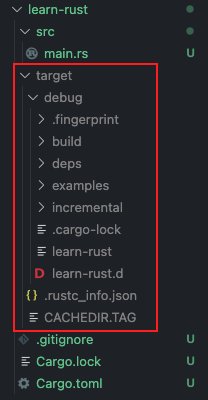
cargo buildOutput
Compiling learn-rust v0.1.0 (/Users/ardityo.mulawarman/Developments/rust/learn-rust)
Finished `dev` profile [unoptimized + debuginfo] target(s) in 0.14scargo build --releaseOutput
Compiling learn-rust v0.1.0 (/Users/ardityo.mulawarman/Developments/rust/learn-rust)
  Finished `release` profile [optimized] target(s) in 0.20s
You will find your compiled file in the target directory, dev for debug mode and release for release mode.
When learning / developing Rust, using unit tests is very helpful because it allows you to test a specific function without relying on the main function. Since Rust programs normally run through main, testing individual functions directly can be inconvenient, and unit tests provide a clean way to isolate and verify each function’s behavior.
fn main() {
    println!("Hello, world!");
}


#[test]
fn testing_only() {
    println!("test only");
}
Running with test mode
cargo test testing_only -- --exact --show-output Output
Finished `test` profile [unoptimized + debuginfo] target(s) in 0.00s
  Running unittests src/main.rs (target/debug/deps/learn_rust-71cb9aac0abdb009)

running 1 test
test testing_only ... ok

successes:

---- testing_only stdout ----
test only


successes:
    testing_only

test result: ok. 1 passed; 0 failed; 0 ignored; 0 measured; 0 filtered out; finished in 0.00s